












































































































































































































































































































































































































































































URL Structure
A URL (Uniform Resource Locator) is also known as a web address. It's a unique identifier for a specific resource on a web server.
URLs were designed to replace IP addresses
URLs allow users to locate specific resources/websites they're looking for
To understand how URLs work, you'll need to understand various components that make up a URL
2 types of URL -
- Absolute (all components from the protocol are contained to the parameters). This is the more secure option.
- Relative (shorter, only contains the location of the resource)
URL Structure
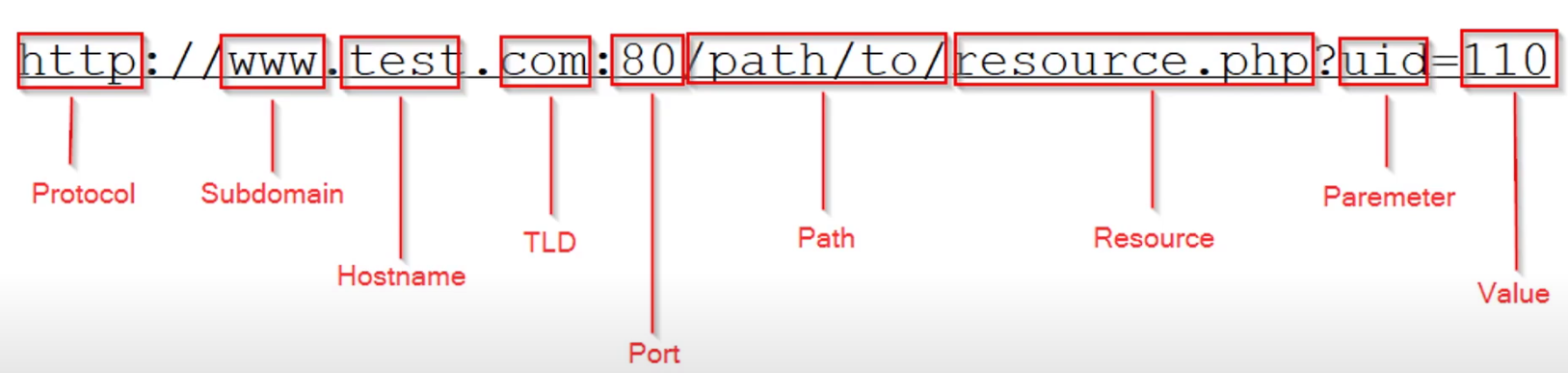
Protocol/scheme
- HTTP, HTTPS, mailto, FTP, etc.
- Specifies what protocol to use when accessing a resource/page
Subdomain
- Specify a specific site you would like to access
Hostname/second-level domain
- Hostname/name of website
TLD (Top-Level Domain)
- .com/.org, etc
Port
- Specify the port the web server is accessible from
Path to resource
- Sub directory
- I.e. Wordpress content directory
- This directory has sub directories with HTML pages typically (home, about, cart, etc)
Resource
- Used to specify the file or resource you're trying to access
- Won't be displayed in the URL probably as the web server will redirect (Apache will do this, most other servers will too)
Parameter
- Query parameters ?username=admin&password=test&Login=Login#
Value
An example of a potentially vulnerable URL value, this can be modified.
